
Every cable run, switch port, and access point you install becomes a liability the moment nobody can find it on paper. Network documentation software solves that problem by giving you a single, searchable source of truth for your entire infrastructure, from physical cabling paths to logical network maps and device inventories. Without it, troubleshooting takes longer, expansions get messy, and new team members waste hours tracing lines that should already be mapped.
At CommX Networks, we design and install structured cabling, LAN environments, and wireless systems for commercial facilities across Southwest Florida. We’ve seen firsthand what happens when a warehouse or office complex has thousands of cable drops and zero documentation to back them up. That experience has given us a strong opinion on which tools actually work for keeping infrastructure organized at scale.
This guide breaks down 10 of the best network documentation software tools available in 2026. We compared features like automated device discovery, topology mapping, and collaboration capabilities to help you find the right fit. Whether you’re an IT director managing a multi-building campus or a facility manager overseeing a single site, this list covers options for every budget and use case.
Domotz is a cloud-based network monitoring and documentation platform built for managed service providers and IT teams that need continuous visibility across multiple sites. It combines automated device discovery with real-time monitoring, making it one of the more practical network documentation software options for teams managing distributed commercial environments.
This tool works best for MSPs managing multiple client networks or in-house IT teams overseeing several branch locations. If you run a warehouse or office campus where devices change frequently, Domotz handles that fluid environment without requiring manual inventory updates every time something connects or drops off the network.
The platform scans your network automatically using SNMP, ICMP, and ARP protocols to identify every connected device. It logs IP addresses, MAC addresses, hostnames, open ports, and manufacturer details. You get a continuously updated device inventory without manual input after the initial setup.
Topology views in Domotz generate visual network maps automatically based on discovered devices and their relationships. You can see how devices connect through switches and routers without building anything by hand. These maps update in real time, so a new device or a dropped connection shows up immediately without requiring a manual redraw.
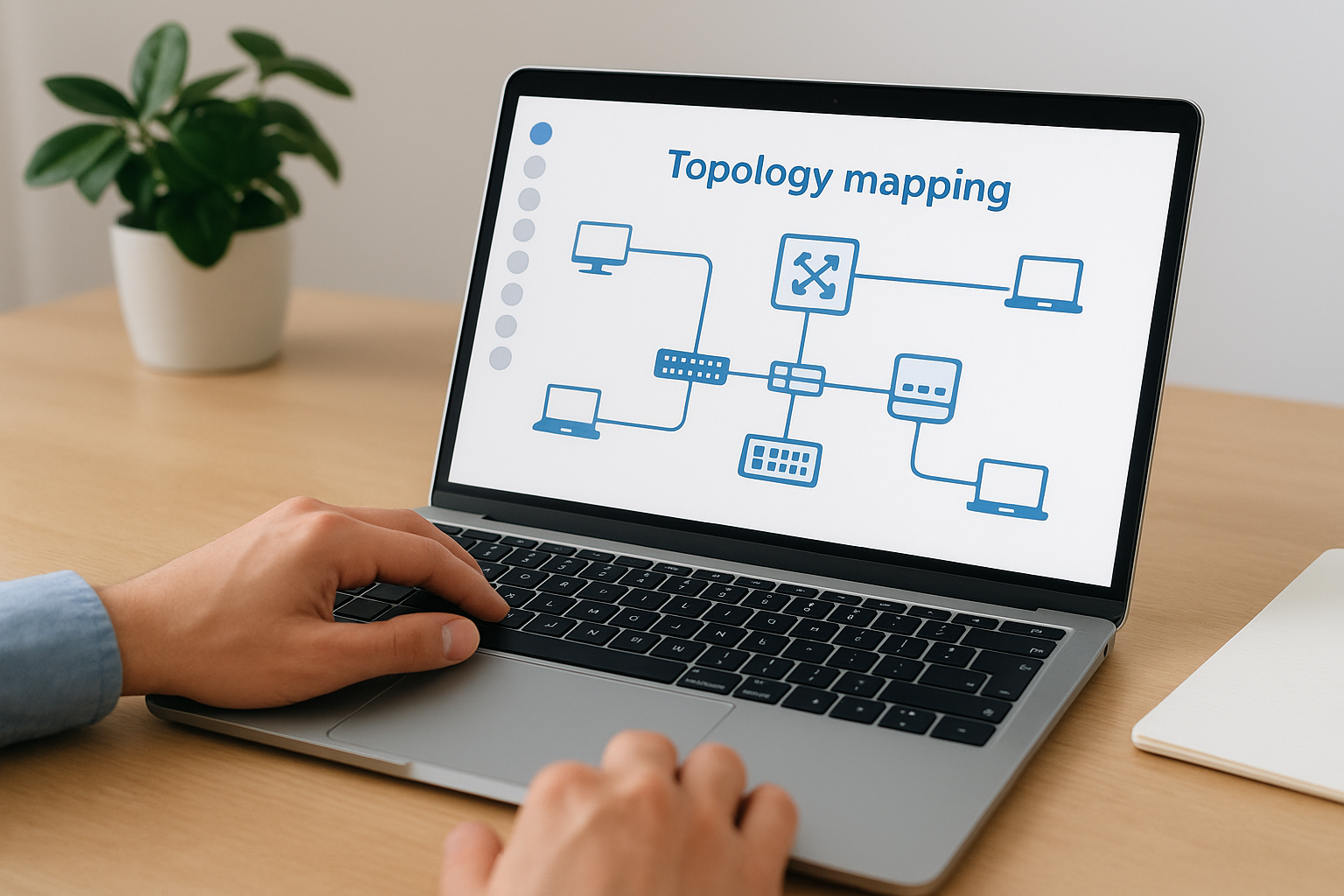
Domotz topology maps are particularly useful for spotting rogue devices or unauthorized connections before they turn into a security issue.
You get native integrations with PSA and RMM platforms including ConnectWise, Autotask, and ServiceNow, which fits naturally into MSP billing and ticketing workflows. Device reports export in CSV format, and the open API lets you push documentation into third-party systems if your workflow requires a custom setup.
Pricing follows a per-network model, meaning you pay based on the number of sites or networks you monitor rather than per device. That structure keeps costs predictable as your device count grows within a single location, though it adds up quickly if you manage dozens of separate client sites or small branch networks.
One notable gap is depth of documentation. If you need detailed cable plant records, patch panel schedules, or rack elevation diagrams, you’ll need a separate tool to cover that ground. The platform also requires a stable cloud connection for full functionality, so sites with strict data sovereignty policies or unreliable internet will want to factor that dependency into the decision.
Auvik is a cloud-based network management platform that combines automated discovery, topology mapping, and configuration backup in one interface. It targets MSPs and internal IT teams who need fast visibility across multiple networks without building documentation manually.
Auvik fits best when you manage several commercial sites simultaneously. Its multi-tenant dashboard gives your team a centralized view of switches, routers, firewalls, and access points across every location without jumping between separate consoles.
The platform uses SNMP, SSH, and CDP/LLDP protocols to scan your network and identify connected devices automatically. It pulls hostname, IP, MAC address, and interface-level data into a continuously updated inventory, so you skip manual entry after the initial setup.
Auvik generates Layer 2 and Layer 3 topology maps automatically from discovered data. These maps update in real time as devices connect or disconnect, making Auvik a strong network documentation software option that stays accurate without extra effort.
Real-time topology updates are particularly useful during troubleshooting because the map reflects your actual network state at that exact moment.
Auvik integrates natively with ConnectWise, Autotask, Datto, and HaloPSA, fitting naturally into MSP billing and ticketing workflows. You can export device inventory data and reports to share with clients or internal stakeholders.
Auvik charges on a per-billable-device model that scales with your managed device count. Core devices like switches and routers cost more than secondary devices such as workstations, so costs can climb fast on dense networks.
Auvik does not cover physical cable plant documentation such as patch panel schedules or rack diagrams. You will also need a separate tool for asset management that goes beyond network-connected devices.
NetBox is an open-source network documentation software and IPAM platform originally developed by DigitalOcean. It gives your team a structured database for modeling physical and logical infrastructure, from rack layouts and cable runs to IP address blocks and VLANs, all in one place.
NetBox fits best for in-house IT teams and network engineers who want full control over their documentation platform without paying ongoing subscription fees. If your organization has the technical staff to install, maintain, and extend the tool, you get a highly customizable system that adapts to complex multi-site environments including data centers, manufacturing plants, and office campuses.
The platform uses a structured relational data model that connects devices, interfaces, IP addresses, cables, and sites into a unified record. You define your infrastructure as objects with relationships, so a switch port links directly to the cable connected to it, the patch panel port it terminates at, and the device on the other end. That chain of relationships makes tracing a network path significantly faster than searching spreadsheets.

NetBox’s object-based model is one of the most thorough approaches to physical layer documentation available in any open-source tool.
NetBox does not include built-in automated discovery. Your team populates it manually or through external scripts and integrations. Tools like Nautobot plugins or custom Python scripts can push data in, but keeping records current requires discipline and a clear workflow.
The platform offers a full REST API and GraphQL interface, making it straightforward to connect with Ansible, Terraform, and custom automation pipelines. Many teams use NetBox as the source of truth that feeds provisioning workflows.
NetBox is free to use under an Apache 2.0 license. You host it yourself, which means you cover server costs and maintenance. A commercial version called NetBox Cloud exists if you prefer a managed hosting option with vendor support.
The biggest limitation is the manual data entry requirement. Without automated discovery, your documentation is only as accurate as the last person who updated it. The tool also has a steeper learning curve compared to SaaS options, so smaller teams without dedicated network engineers may find the setup and ongoing management challenging.
ManageEngine OpManager is a network monitoring and management platform that covers performance tracking, fault management, and infrastructure documentation for mid-size to enterprise environments. It gives your IT team a unified view of devices, connections, and performance data without bouncing between separate tools.
OpManager fits well for mid-size businesses and enterprise IT teams that want monitoring and documentation consolidated into one platform. It handles environments with a mix of routers, switches, firewalls, and servers spread across multiple sites or building floors.
The platform uses SNMP, WMI, and CLI protocols to scan and inventory connected devices automatically. It records IP addresses, device types, interface details, and performance baselines without requiring manual input after your initial configuration.
OpManager generates Layer 2 and Layer 3 network maps that update automatically as your environment changes. These visual maps help you spot connectivity gaps and device relationships quickly during active troubleshooting.
Topology maps in OpManager link directly to live performance data, so clicking a device on the map pulls up its current CPU load or bandwidth usage immediately.
The platform backs up device configurations on a scheduled basis and alerts your team when a change occurs. That capability makes OpManager a capable network documentation software option for teams managing compliance or audit requirements.
OpManager follows a perpetual license model with optional subscription pricing. Costs scale by device count tiers, and add-on modules for configuration management carry separate pricing on top of the base platform.
Physical layer records like cable plant documentation and patch panel schedules fall outside what OpManager covers. Setup also carries a steep learning curve for teams configuring custom discovery profiles or compliance reports for the first time.
SolarWinds Network Topology Mapper (NTM) is a dedicated topology discovery and diagramming tool designed to scan your network and produce accurate, exportable maps. Unlike full monitoring platforms, it focuses specifically on building and maintaining network diagrams rather than providing real-time performance data.
NTM fits teams that need clear, structured topology diagrams for compliance audits, internal documentation, or handoff to infrastructure partners. If your primary goal is accurate maps rather than continuous monitoring, this tool covers that job without the overhead of a full management suite.
The tool uses SNMP, ICMP, and CDP/LLDP protocols to discover routers, switches, firewalls, and endpoints across your environment. It captures IP addresses, device roles, and interface relationships and organizes that data into a structured inventory that feeds directly into your diagrams.
NTM’s multi-protocol discovery approach reduces gaps in your device inventory compared to tools that rely on a single scan method.
SolarWinds NTM produces Visio-compatible and Orion-compatible diagram exports, which makes it useful for teams that already use Microsoft Visio or other SolarWinds products. Your maps can include Layer 2 and Layer 3 views along with physical and logical layouts to satisfy different documentation requirements.
You can schedule recurring network scans to detect changes automatically rather than relying on manual re-runs. When the scan finds a topology difference from the previous baseline, NTM flags the change so your team can review and update documentation accordingly.
SolarWinds NTM sells under a perpetual license model with a one-time purchase cost, making it more affordable long-term compared to subscription-based network documentation software options.
The tool does not provide real-time monitoring or alerting, so you will need a separate platform if continuous visibility matters. Physical cable documentation also falls outside its scope entirely.
IP Fabric is a network assurance and documentation platform that builds a verified model of your entire network from live discovery data. It goes beyond standard inventory tools by analyzing how traffic actually flows through your infrastructure, making it a strong network documentation software option for large, complex environments.
IP Fabric fits enterprise IT teams and large-scale network operators who need verified, intent-based documentation rather than manually maintained records. It works particularly well for organizations running multi-vendor environments with hundreds or thousands of devices across data centers and campuses.
The platform connects to your devices using SSH, Telnet, and API calls to pull configuration and state data directly from the source. It builds a complete, protocol-level inventory covering routing tables, spanning tree, VLANs, and interface states without relying on manual entry.
IP Fabric creates a digital twin of your network that reflects its exact state at the time of discovery. You can take point-in-time snapshots to compare current conditions against a known-good baseline, which simplifies compliance reporting and change validation significantly.

Snapshot comparisons let you pinpoint exactly what changed between two points in time without sifting through logs manually.
The platform models end-to-end traffic paths across your entire network, letting you verify whether a specific flow will pass through or get blocked. This capability speeds up both troubleshooting sessions and security audits considerably.
IP Fabric charges based on device count under management, and pricing sits at the enterprise level. You typically need to contact their sales team for a quote.
The platform does not cover physical cable plant or rack documentation, and the cost puts it out of reach for most small or mid-size teams.
NetBrain is an enterprise network automation platform that combines automated discovery with dynamic mapping and runbook-driven troubleshooting. It positions itself as more than standard network documentation software by linking your documentation directly to the workflows your team uses to fix problems.
NetBrain fits large enterprises and service providers managing complex, multi-vendor networks where manual documentation processes create operational bottlenecks. Your team benefits most when you need automated workflows tied directly to your network map rather than static diagrams.
The platform scans your environment using SNMP, SSH, and vendor APIs to build a comprehensive device and topology inventory. It captures interface states, routing protocols, and configuration data continuously, keeping your records aligned with your live network.
NetBrain generates dynamic maps that update automatically as your network changes. The platform also attaches runbooks directly to devices on your map, so your team can trigger step-by-step diagnostic workflows from within the documentation interface without switching tools.
Runbooks tied to map objects turn your network documentation into an active troubleshooting resource rather than a passive reference.
You can capture network state baselines at any point and compare them against current conditions to identify what changed. That comparison capability supports both change management reviews and compliance audits without manual data collection.
NetBrain uses enterprise-level pricing tied to device count, and you need to contact their sales team directly for a quote. Expect costs that reflect its position as an advanced automation platform rather than a basic documentation tool.
Physical cable plant records and rack-level documentation fall outside NetBrain’s scope. The platform also carries a significant implementation effort that requires dedicated time from experienced network engineers before it delivers full value.
netTerrain Logical is a dedicated network documentation software platform built by Graphical Networks that focuses on creating detailed, relationship-driven diagrams of your logical and physical infrastructure. It targets organizations that need more diagramming depth than a standard monitoring tool provides.
netTerrain fits best for network engineers and IT teams in mid-size to enterprise environments who maintain complex infrastructure across multiple sites. Your team benefits most when accurate, layered diagrams matter more than real-time performance data.
The platform imports data through integrations with discovery tools, SNMP scans, and CSV imports to populate your infrastructure model. It does not perform native deep discovery on its own, so you feed it data from existing monitoring or scanning tools to keep records current.
netTerrain produces highly detailed diagrams covering physical ports, virtual machines, and logical network layers within a single connected model. You can drill from a high-level site map down to individual port connections, which gives your team a clear view of how every layer relates to the ones below it.
That drill-down capability is especially useful during troubleshooting because you can trace a problem from a logical symptom straight down to a physical cable connection.
The platform models relationships between devices, interfaces, and network segments so your documentation reflects actual dependencies rather than isolated records. You can generate custom reports based on those relationships for audits or project planning.
netTerrain sells under a perpetual or subscription license depending on the deployment model you choose, with pricing based on node count.
The platform relies heavily on external data sources to stay accurate, and setup requires meaningful configuration time before your diagrams reflect your real environment.
IT Glue is a cloud-based IT documentation platform built primarily for MSPs that need a centralized, structured place to store network records, credentials, and client information. It treats documentation as a core business process rather than a task your team gets to when time allows, which separates it from most generic network documentation software options.
This platform fits best for MSPs and internal IT teams that manage multiple client environments and need one organized repository for all network-related records. Your team benefits most when you handle a high volume of client sites and need consistent documentation standards across all of them.
IT Glue uses a structured asset-based model that organizes records around devices, credentials, and flexible asset templates. Your team can build standardized documentation templates for switches, firewalls, and access points that stay consistent across every client or location you manage.
The platform supports embedded diagrams and configuration records stored alongside individual device assets, so your documentation connects directly to the hardware it describes. You can attach port maps, runsheets, and credentials to specific device records for fast access during active troubleshooting.
Linking credentials and diagrams to individual device records cuts the time your team spends searching during an outage compared to hunting through separate folders or shared drives.
IT Glue integrates with Auvik, Domotz, and ConnectWise to pull discovered device data into your records automatically, which reduces manual entry and keeps your documentation more accurate over time.
The platform charges on a per-user, per-month subscription model, with feature access varying across tiers.
IT Glue does not perform native network discovery on its own, so it depends entirely on connected tools to stay current. Teams without a linked monitoring or discovery platform will find themselves maintaining records by hand.
Lucidchart is a cloud-based diagramming platform that many IT teams use to build network diagrams, rack layouts, and infrastructure maps through a drag-and-drop interface. It sits in a different category from automated discovery tools, but it fills a real gap for teams that need clean, shareable diagrams without the cost or complexity of a full network management suite.
Lucidchart fits best for small IT teams, consultants, and project managers who need clear network diagrams for presentations, client handoffs, or internal documentation without managing a dedicated network tool. Your team benefits most when visual communication matters more than automated data collection.
The platform handles logical and physical network layouts, rack diagrams, and data flow maps effectively. Your inventory and device data go in manually, though. There is no native discovery engine, so keeping diagrams accurate requires consistent effort from whoever owns the documentation process.
Lucidchart supports standard network shape libraries including Cisco, AWS, and Azure icons, which keeps your diagrams consistent with industry conventions. Multiple team members can edit the same diagram simultaneously in the browser, which removes the version control headaches that come with shared Visio files.
Real-time collaboration eliminates the confusion of working from outdated diagram versions sent back and forth over email.
Lucidscale is a separate Lucid product that connects to cloud environments like AWS and Azure to generate architecture diagrams automatically from your live cloud data. If your network documentation software needs include cloud infrastructure mapping, Lucidscale extends what Lucidchart produces without manual drawing.
Lucidchart offers a free tier with limited features and paid plans starting at the individual level, scaling up to team and enterprise tiers with added sharing controls and integrations.
The platform covers diagrams only, with no monitoring, discovery, or configuration backup built in. Every record requires manual input and upkeep, which limits its usefulness as a standalone solution for large or fast-changing environments.
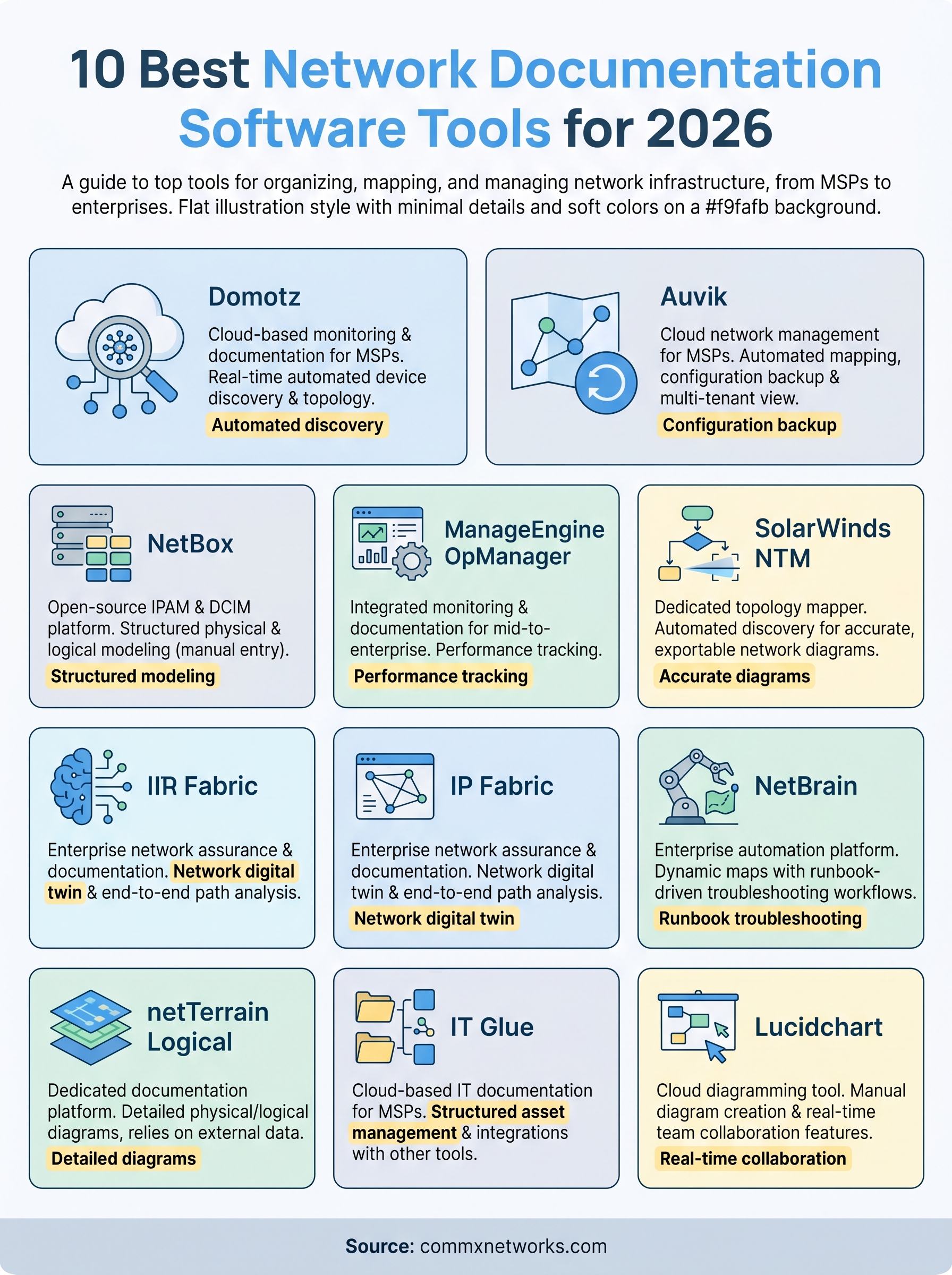
No single network documentation software option fits every team. Your choice comes down to three factors: the size of your environment, whether you need automated discovery or manual control, and how much your team can realistically maintain. Auvik and Domotz suit MSPs managing multiple client sites. NetBox and IP Fabric fit engineering-heavy teams that need deep control. IT Glue serves documentation-focused workflows, while Lucidchart covers teams that prioritize clean, shareable diagrams over automation.
Before any software delivers accurate records, your physical infrastructure needs to be installed correctly and consistently. Mislabeled cable runs, undocumented drops, and improvised switch configurations create gaps that no tool can fill on its own. If your cabling or network infrastructure needs a proper foundation first, CommX Networks designs and installs structured cabling and LAN environments built to industry standards across Southwest Florida. Start with solid infrastructure, then document it accurately.