
Every device on your business network, from VoIP phones to security cameras to warehouse scanners, depends on the cable connecting it to the rest of the system. Choose the wrong cable, and you’re looking at bottlenecks, dropped connections, and costly rework. That’s why having ethernet cabling explained in practical terms matters, especially when you’re planning a buildout or upgrading an existing facility. The cable you pull through your walls and cable trays today will either support your operations for the next decade or hold them back.
But Ethernet cabling isn’t one-size-fits-all. Cat5e, Cat6, Cat6a, Cat8, each category exists for a reason, with real differences in speed, shielding, and distance ratings that affect performance in commercial environments. Understanding those differences before you spec a project saves time, money, and headaches. It’s the kind of decision that separates a reliable network from a frustrating one.
At CommX Networks, we’ve spent 18 years designing and installing structured cabling systems for commercial facilities across Southwest Florida. This article breaks down Ethernet cable types, their specifications, and where each one fits in a real-world business setting, so you can make informed decisions about the physical backbone of your network. We’ll cover everything from basic construction to category-by-category comparisons and the use cases that match each one.
Why Ethernet cabling still matters in 2026
Wi-Fi has become a standard feature in nearly every commercial building, and it’s tempting to treat wireless as the default solution for connecting devices. But wireless signals are shared bandwidth, meaning the more devices you add to an access point, the less throughput each one gets. For a business running VoIP phones, security cameras, point-of-sale terminals, and cloud applications simultaneously, that shared bandwidth becomes a serious performance problem. Ethernet cabling gives each device a dedicated connection, which translates to consistent speeds and reliable uptime, even in high-density environments.
Wired Ethernet connections deliver consistent, low-latency throughput that wireless simply cannot match in high-demand commercial environments.
Wi-Fi alone isn’t enough for commercial networks
Wireless technology has improved significantly over the years, but it still depends on a wired backbone to function at full capacity. Every wireless access point in your building connects back to your network infrastructure through a physical cable, usually an Ethernet run to a switch in your MDF or IDF. If those underlying cable runs are undersized for your current data volume, even the newest Wi-Fi 6 or Wi-Fi 6E access points won’t deliver their rated performance. The wireless side of your network is only as strong as the structured cabling system feeding it.
A common mistake in commercial buildouts is over-investing in wireless hardware while underspecifying the cabling plant. You can install top-of-the-line access points throughout a warehouse, but if the cables connecting them are Cat5e running at capacity, your wireless users will still experience lag and dropped packets. Having ethernet cabling explained at the infrastructure planning stage, rather than after installation, saves you from that kind of costly mismatch between your hardware investment and your actual throughput.
The bandwidth demands on commercial networks keep climbing
In 2026, the average commercial facility runs far more connected devices than it did five years ago. IP-based security cameras, building automation systems, cloud-connected machinery, and VoIP endpoints have all pushed network traffic volumes higher. A distribution center that used to manage a few dozen devices on its network might now handle hundreds, each generating continuous data streams that put real pressure on your cabling infrastructure‘s capacity.
Beyond device count, application bandwidth requirements have also increased sharply. Video surveillance systems that used to record at 720p now record at 4K. Cloud platforms that used to sync files now stream entire workloads. Businesses running real-time inventory software or connected manufacturing equipment push sustained traffic loads that older cabling categories cannot support reliably, and upgrading the cable category is often the most direct way to add headroom without pulling new runs later.
Long-term cost savings from getting the cabling right the first time
Cable installation is one of the few parts of your network where the labor cost far exceeds the material cost. Pulling cable through conduit, ceiling plenums, and wall cavities requires licensed technicians and significant time on-site. If you install a lower-grade cable to save money upfront and then need to upgrade it in two or three years as your network demands grow, you pay that labor cost a second time while also dealing with operational disruption during the rework.
Specifying the right cable category for your current and anticipated needs is a straightforward way to avoid that situation. Most commercial projects in Southwest Florida benefit from running Cat6 or Cat6a as a baseline, since the price difference between cable categories is small compared to the installation labor, and the performance headroom is substantial. Building your physical infrastructure to handle more than you need today protects your investment and keeps your network scalable as your business grows.
How Ethernet cabling works in plain English
Ethernet cables transmit data as electrical signals between two network devices. When your computer sends a file, the signal travels down the cable as a series of voltage changes that the receiving device interprets as binary data. Every Ethernet cable you install is essentially a controlled highway for those signals, keeping them organized, protected from interference, and moving at the speed your network equipment expects.
What’s inside the cable
Opening the jacket on an Ethernet cable reveals a bundle of eight copper wires arranged in four twisted pairs. The twisting is not decorative. It’s an engineering solution to a problem called crosstalk, which occurs when the electrical signal on one wire bleeds into an adjacent wire and corrupts the data traveling on it. Twisting each pair at a precise rate causes interference from outside signals to cancel itself out, a principle called differential signaling. The tighter the twist rate, the more effective the protection, which is one reason higher-category cables perform better in electrically noisy environments like warehouses or manufacturing floors.
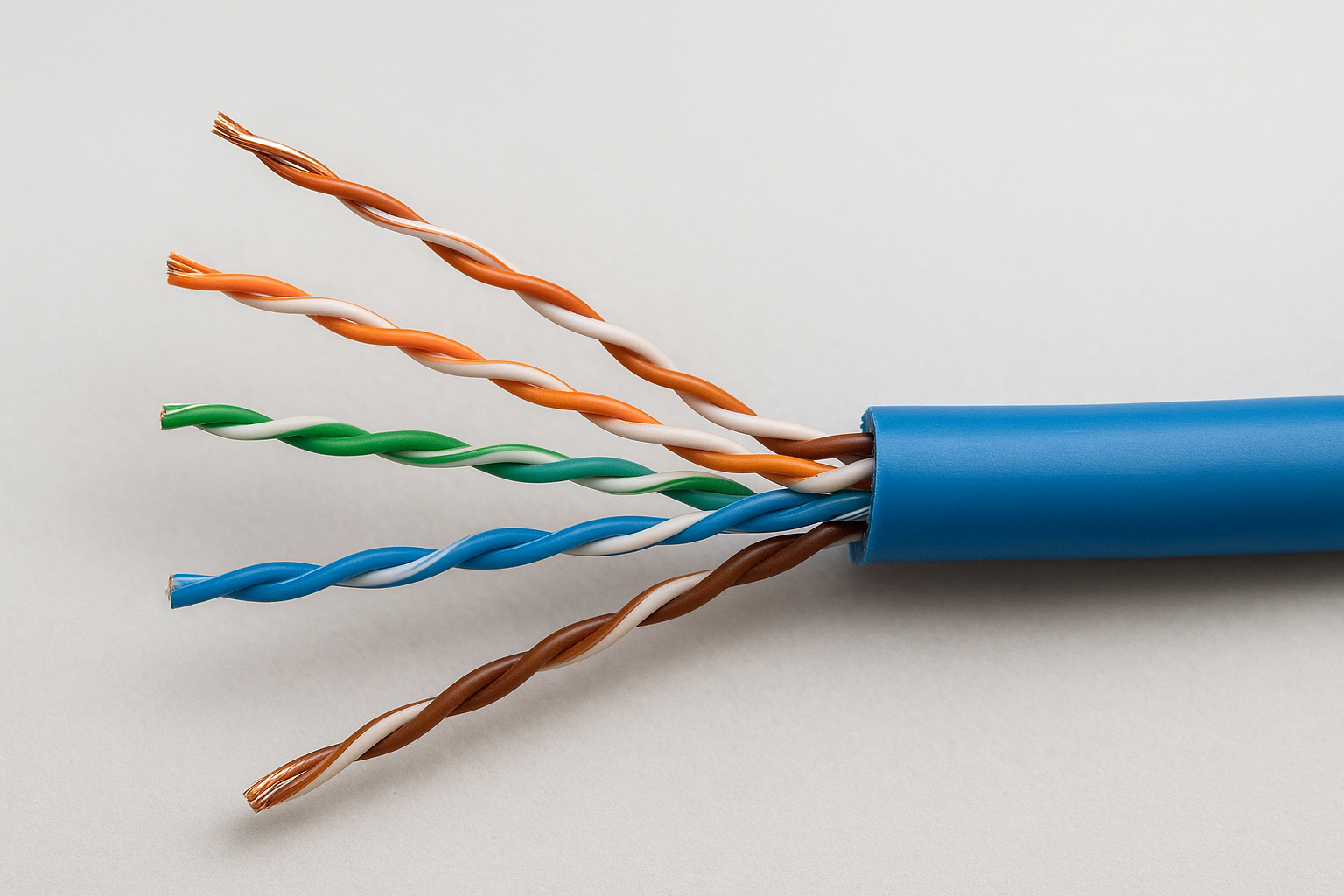
The twist rate of each wire pair is one of the primary factors that separates a Cat5e cable from a Cat6 or Cat6a in terms of noise rejection and signal integrity.
Each twisted pair carries a separate signal stream. Modern Ethernet standards use all four pairs simultaneously through a process called full-duplex transmission, which allows data to travel in both directions at the same time without collisions. Full-duplex operation is what gives Ethernet the consistent throughput your network equipment advertises, because send and receive traffic never compete for the same wire at the same time.
How the signal reaches its destination
At each end of the cable, an RJ45 connector terminates the wire pairs in a specific order called a wiring standard. The two most common standards in commercial work are T568A and T568B. Both work correctly as long as the same standard appears on both ends of the run. Your network switch and each connected endpoint device use a transceiver that sends and receives signals on the wire, converting electrical pulses back into usable data.
Having ethernet cabling explained at this level helps you understand why installation quality matters as much as cable category. A cable with poor terminations or damaged wire pairs will underperform regardless of its rated speed. Physical signal integrity depends on every connection point in the run, not just the cable itself, because a single bad crimp can degrade performance across the entire channel.
Ethernet cable types and what Cat ratings mean
The "Cat" in Cat6 or Cat6a stands for category, a classification defined by the Telecommunications Industry Association (TIA) that sets minimum performance requirements for Ethernet cables. Each category specifies the cable’s maximum operating frequency in megahertz (MHz), which directly determines how much data the cable can carry reliably over a given distance. Higher frequency ratings mean more signal cycles per second and greater bandwidth capacity, which is why category upgrades matter as network demands increase.
What the category rating actually measures
Category ratings define performance requirements across several technical criteria, including attenuation (signal loss over distance) and crosstalk rejection (interference between wire pairs). A cable that meets Cat6 requirements performs measurably better than Cat5e on both counts because of tighter twist rates and the addition of a plastic spline that physically separates the wire pairs inside the jacket. That physical separation reduces the noise generated when signals on adjacent pairs interfere with each other.
Getting ethernet cabling explained at the category level helps you understand that cable quality is about signal integrity across the full run, not just the speed rating printed on the box.
The category rating also accounts for channel performance, meaning the complete path from your switch port to the endpoint device, including patch cables, keystone jacks, and patch panels in the link. A Cat6a cable terminated with Cat6 components becomes a Cat6 channel, so the category of every component in the run must match to achieve the rated performance.
Cat5e through Cat8: what changes with each step
The table below shows the key specifications for the cable categories you’ll encounter in commercial work:
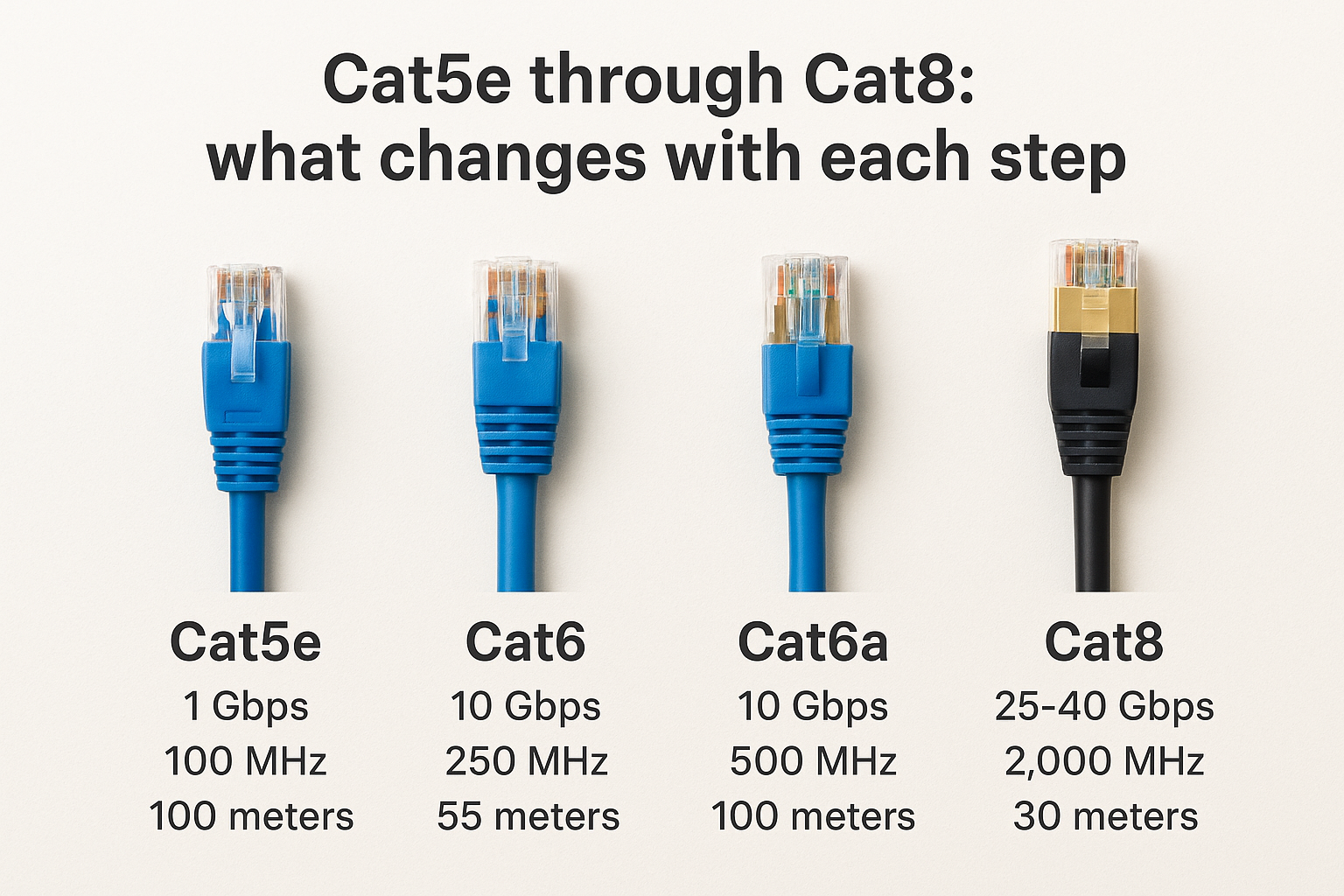
| Category | Max Speed | Frequency | Max Distance at Top Speed |
|---|---|---|---|
| Cat5e | 1 Gbps | 100 MHz | 100 meters |
| Cat6 | 10 Gbps | 250 MHz | 55 meters |
| Cat6a | 10 Gbps | 500 MHz | 100 meters |
| Cat8 | 25-40 Gbps | 2,000 MHz | 30 meters |
Cat5e remains in many older Southwest Florida office buildings, but new commercial installations should start at Cat6 at minimum, with Cat6a as the preferred baseline for any environment where future-proofing matters. Cat8 suits data center cabling between servers and switches rather than general building infrastructure, where the 30-meter distance cap makes it impractical for most structured cabling runs outside a server room.
Speed, distance, and the 100-meter rule
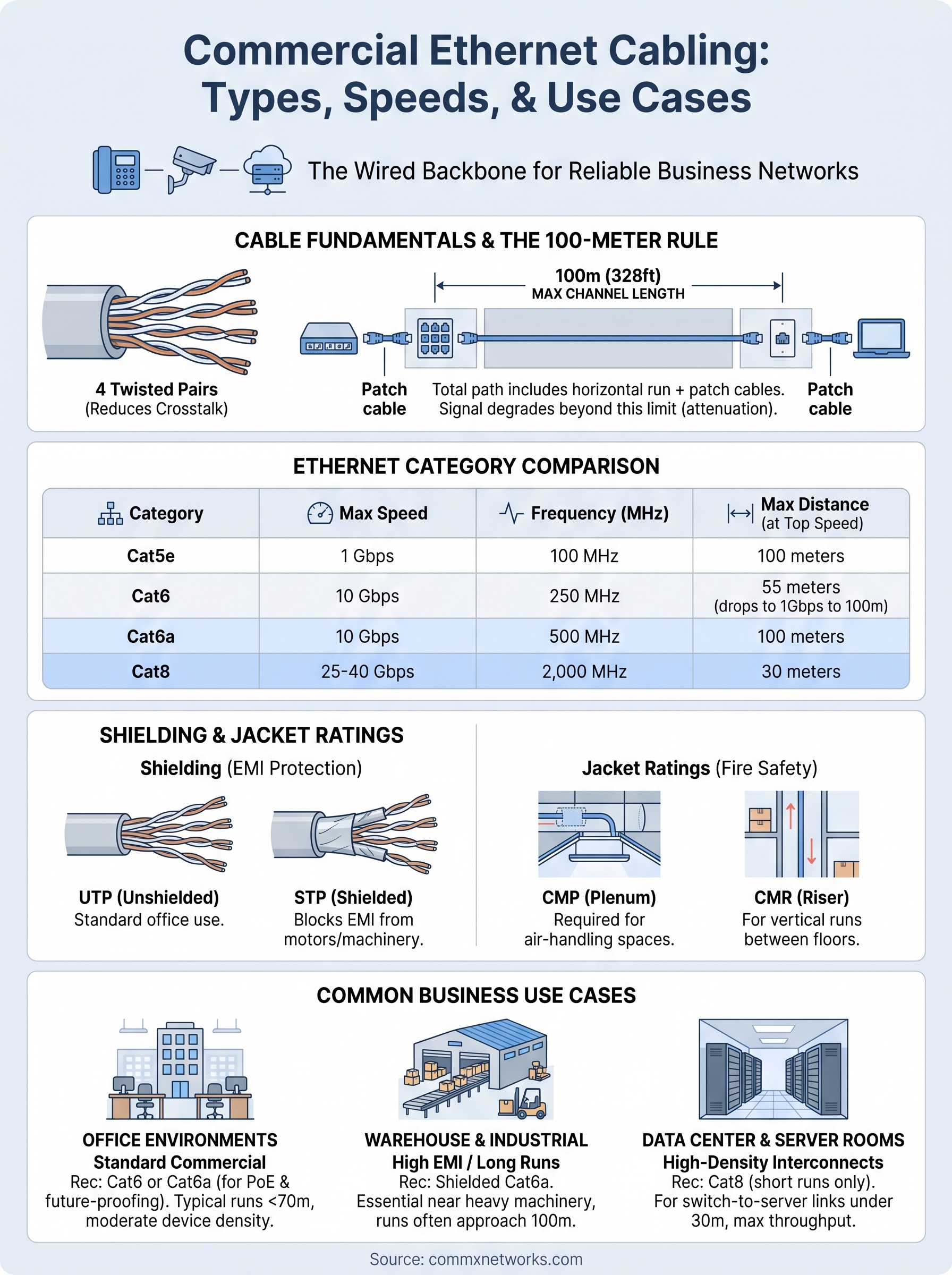
Ethernet cabling has a maximum segment length of 100 meters (328 feet) from the network switch to the endpoint device. This limit isn’t arbitrary. As electrical signals travel through copper wire, they lose strength through a process called attenuation. Beyond 100 meters, the signal degrades enough that the receiving device can no longer interpret it reliably, causing packet loss and dropped connections that hurt operations in any busy commercial facility.
How speed ratings relate to distance
Cable categories don’t all reach their top speeds at the full 100-meter mark. Cat6 supports 10 Gbps only up to 55 meters, then drops to 1 Gbps for runs between 55 and 100 meters. Cat6a maintains 10 Gbps across the full 100-meter channel, which is why it’s the practical choice for most commercial installations where you can’t always predict exactly where equipment will land or how long each cable run will be.
If your runs regularly exceed 55 meters, Cat6a is the only copper option that guarantees 10 Gbps performance without measuring every individual run.
Getting ethernet cabling explained at this level helps you avoid a common planning mistake: specifying Cat6 for a facility where most runs will fall between 70 and 90 meters. In that scenario, you’d be paying for 10 Gbps capability but receiving 1 Gbps performance on those longer runs, which means the category upgrade over Cat5e delivers almost no practical benefit. Mapping your actual run lengths before pulling cable prevents that kind of costly mismatch.
What counts toward the 100-meter total
The 100-meter limit applies to the entire channel, not just the horizontal run through your walls and ceiling. Your total includes the patch cable at the wall jack, the horizontal cable to the patch panel, and the patch cable from the panel to the switch. TIA standards allocate up to 10 meters for patch cables on both ends, leaving 90 meters for the horizontal segment. Longer-than-standard patch cables on either end reduce that remaining budget and can push a run over the limit without you realizing it.
When a facility’s floor plate forces cable routes beyond 100 meters, the solution is placing an intermediate distribution frame (IDF) closer to the devices that need connectivity. Each IDF resets the channel, so your horizontal runs stay within the limit. Fiber optic cabling between your MDF and IDF handles the longer backbone distance without signal loss, since fiber supports runs spanning thousands of meters without degradation.
Shielding, jacket ratings, and where to run cable
Ethernet cables come in two main construction types: unshielded twisted pair (UTP) and shielded twisted pair (STP). UTP relies entirely on the twist rate of each wire pair to reject interference, while STP adds a physical metallic barrier around the pairs, the cable bundle, or both. For most office environments, UTP performs reliably without the added cost and complexity of shielding. But in commercial facilities where cable routes pass near electrical conduit, motors, or heavy machinery, shielding becomes a practical necessity rather than an optional upgrade.
Unshielded vs. shielded cable: when shielding matters
Electromagnetic interference (EMI) from motors, HVAC systems, and industrial equipment can corrupt data signals on unshielded cable runs, producing intermittent connectivity problems that are difficult to diagnose and expensive to fix after installation. Shielded cable addresses this by wrapping the wire pairs in a foil or braided metal layer that blocks external interference from reaching the conductors. For warehouses, manufacturing plants, and distribution centers in Southwest Florida, shielded Cat6a is often the right specification for runs near high-voltage equipment or parallel electrical conduit.
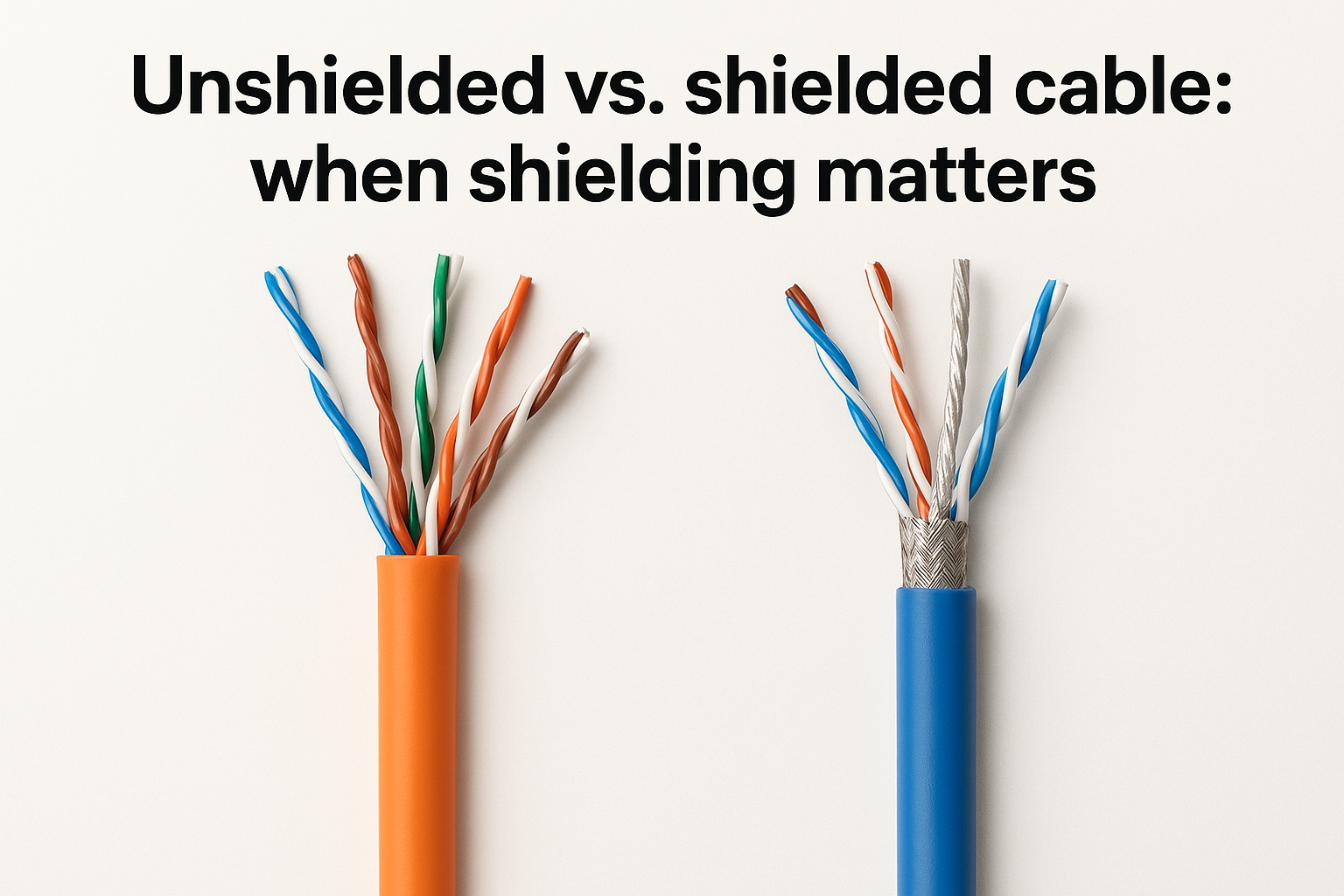
Proper grounding at both ends of a shielded run is not optional. Without a solid ground connection, the shield itself can act as an antenna and actually pull in more interference rather than blocking it. That grounding requirement adds steps to the installation process, which is one more reason to have ethernet cabling explained at the planning stage rather than discovering the requirement mid-project after the cable is already pulled.
Jacket ratings and where you can legally run cable
Plenum-rated cable (CMP) is required in any air-handling space, including ceiling plenums and raised floor areas where conditioned air circulates. Plenum jackets use a low-smoke, flame-retardant compound that resists burning and limits toxic smoke output if a fire occurs. Riser-rated cable (CMR) suits vertical runs between floors in enclosed conduit or dedicated riser shafts where it won’t contact circulating air. Standard PVC-jacketed cable belongs only in conduit runs inside walls where it stays isolated from air-handling spaces entirely.
The jacket rating on your cable determines where it can legally and safely be installed, and using the wrong type can fail a building inspection and require a full cable replacement.
Matching the correct jacket rating to each cable route is a code compliance requirement, not a preference. Most commercial projects in Southwest Florida mix plenum and riser cable depending on the building’s layout, so mapping your cable routes before ordering materials prevents costly reorders and delays that push your project past its go-live date.
Choosing the right cable for common business uses
No single cable category works best for every situation. Your building type, run lengths, and the devices you’re connecting all factor into the right specification. The goal is matching the cable to the actual demands of the environment rather than defaulting to whatever was used in the last project.
Office environments and standard commercial buildouts
Most office environments, including professional services firms, medical offices, and retail centers, run well within the performance envelope of Cat6. Typical runs in these settings fall under 70 meters, devices generate moderate bandwidth demand, and the cabling routes stay away from heavy electrical interference. Cat6 at 250 MHz gives you comfortable headroom above what most office workloads require today, with enough capacity to support VoIP, cloud applications, and video conferencing without bottlenecks.
If your office is planning a buildout or renovation, specifying Cat6a instead of Cat6 adds minimal cost per run while eliminating the distance limitation concern entirely.
For offices running Power over Ethernet (PoE) devices like wireless access points, IP cameras, or desk phones, Cat6a is worth the modest premium. Higher-gauge Cat6a conductors handle the heat generated by PoE delivery better than Cat6, which reduces long-term cable degradation in runs that carry both data and power simultaneously.
Warehouses, manufacturing, and industrial facilities
Large commercial facilities present a different set of challenges. Long cable routes, electrical interference from motors and equipment, and high device density all push you toward Cat6a with shielded construction. Warehouses in Southwest Florida often have floor plates that force runs close to the 100-meter limit, and the manufacturing equipment running nearby creates enough EMI to corrupt signals on unshielded cable. Shielded Cat6a handles both problems at once, and having ethernet cabling explained in this context makes clear why cheaper cable choices create more expensive problems later.
Distribution centers running real-time inventory systems or connected conveyor equipment need sustained throughput with zero tolerance for packet loss, so the investment in shielded Cat6a pays for itself quickly compared to troubleshooting intermittent failures on an underspecified cable plant.
Data centers and server room connections
Inside a server room or IDF closet, Cat8 becomes a practical option for short runs between patch panels, switches, and servers where top-end throughput matters and distances stay under 30 meters. The 2,000 MHz frequency rating and 25 to 40 Gbps speeds suit high-density switching environments where backbone bandwidth between network equipment is the priority. For everything outside the server room, Cat6a remains the stronger choice because the 30-meter cap on Cat8 makes it impractical for general building infrastructure runs.
Final thoughts
Getting ethernet cabling explained in practical terms gives you a real advantage when planning a new buildout, expanding an existing facility, or upgrading an aging network. The cable you choose and how it’s installed determines whether your network supports your business for the next decade or forces a costly rework in two years. Cat6a suits most commercial environments, shielding matters in electrically noisy spaces, and the 100-meter rule shapes every design decision from panel placement to run routing.
None of this needs to be complicated when you work with the right team. CommX Networks has spent 18 years designing and installing structured cabling systems for commercial facilities across Southwest Florida, from small office buildouts to large-scale warehouse deployments. If you’re planning a project or need an honest assessment of your current infrastructure, contact the CommX Networks team to talk through your requirements and get a solution built to perform long-term.