
Choosing between a network rack vs server rack might seem like a minor detail during a buildout, but picking the wrong one creates real problems. Mismatched depth means your servers won’t mount properly. Poor airflow leads to overheating. Inadequate cable management turns your MDF into a rat’s nest within months. These are expensive mistakes to fix after the fact, especially in commercial environments where downtime costs money.
Both rack types use the standard 19-inch rail width and are measured in rack units (U), which is where the similarities start to blur. Network racks are typically shallower, open-frame, and optimized for switches, patch panels, and cable routing. Server racks are deeper, fully enclosed, and built to handle the weight and thermal output of enterprise-grade computing hardware. Understanding these distinctions matters when you’re speccing out infrastructure for a warehouse, office complex, or distribution center, the types of commercial facilities we work with every day at CommX Networks.
With 18 years of designing and installing network infrastructure across Southwest Florida, we’ve mounted thousands of racks in environments ranging from single-room offices to large industrial sites. This guide breaks down the physical specs, functional differences, and practical use cases for each rack type so you can make the right call for your setup. We’ll cover depth, airflow, weight capacity, cable management, and when it makes sense to use one over the other, or both.
Why the rack type matters for your network
When you install the wrong rack type, the problems don’t show up immediately. They appear weeks later when a switch runs hot, a server vibrates loose, or a technician spends two hours untangling cables to swap a single patch panel. The rack is the foundation of your infrastructure, and every piece of hardware mounted in it depends on that foundation being the right fit.
Physical fit and load capacity
The most immediate issue with mismatching rack types is physical incompatibility. A server rack is typically 29 to 36 inches deep, which accommodates the full chassis length of rack-mount servers. A network rack runs shallower at roughly 18 to 24 inches, because switches and patch panels don’t need that extra depth. If you mount a dense 2U server in a shallow network rack, the rear of the chassis hangs past the mounting rails, creating instability and blocking rear cable connections.
Weight matters here too. Network racks carry lighter loads since passive and active networking gear weighs far less than servers loaded with drives and power supplies. Server racks are built with heavier steel, rated floor anchors, and higher static load capacities that can exceed 2,000 pounds. If you spec a network rack for a server deployment, you risk exceeding the rated load and compromising the structural integrity of the entire cabinet.
Choosing the wrong rack based on upfront cost alone can result in hardware damage that costs far more to fix than the rack itself.
Airflow and heat management
Servers generate significant heat, and server racks are designed around this fact. They include front-to-back airflow paths, blanking panels to prevent hot air recirculation, and often integrate with in-row cooling or overhead cooling systems. Network gear typically uses side-to-side or front-to-back airflow but produces less thermal output overall, which is why open-frame network racks work fine in most commercial deployments.
Mixing equipment types in a rack that wasn’t designed for that load makes airflow unpredictable. Hot spots form, thermal shutdowns trigger, and hardware lifespan drops. Understanding the network rack vs server rack distinction from the start lets you plan your cooling strategy correctly rather than retrofitting solutions after equipment starts failing.
What a network rack is and where it fits
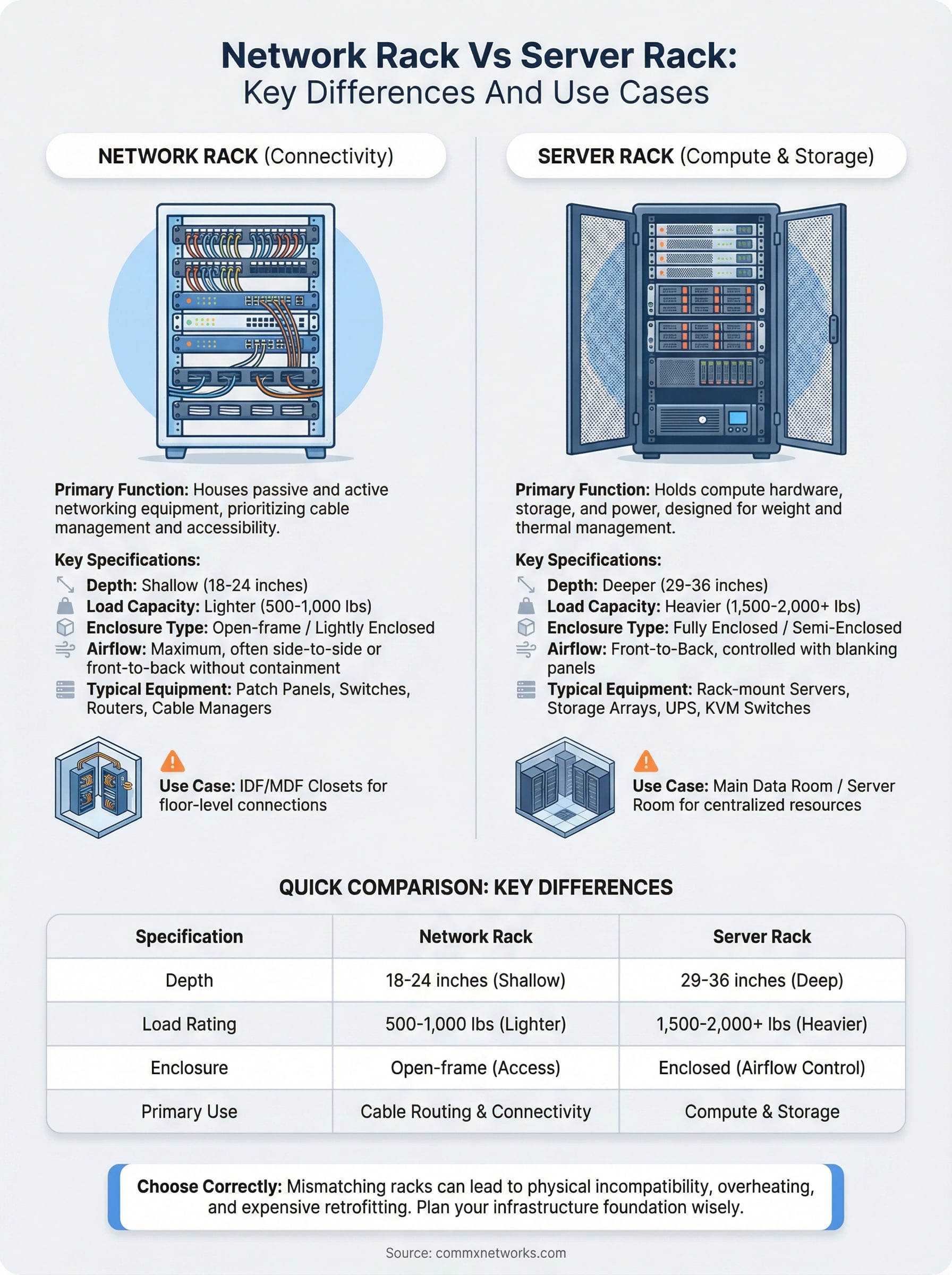
A network rack is an open-frame or lightly enclosed cabinet built to hold passive and active networking equipment like patch panels, switches, routers, and cable management hardware. Because this equipment is physically shallow, network racks typically run 18 to 24 inches deep, keeping the overall footprint compact while making front-and-rear cable access easy for technicians. They use the same standard 19-inch rail width as server racks and are measured in rack units, but the form factor is purpose-built for connectivity hardware rather than compute.
Physical design and typical dimensions
Network racks commonly ship as open-frame two-post or four-post designs, which gives technicians unobstructed access to ports and cables from all sides. Some configurations add side panels or a locking front door, but the priority is always maximum airflow and accessibility rather than environmental containment. Because networking gear runs significantly cooler than servers, open-frame construction manages heat without dedicated cooling infrastructure.
Open-frame designs cut cable management time and make routine adds, moves, and changes faster for your team.
Here is the type of equipment you will typically find mounted in a network rack:
- Patch panels (Cat6 and fiber)
- Managed and unmanaged switches
- Wireless LAN controllers
- Horizontal cable management panels
Where network racks fit in commercial deployments
You will typically find network racks in MDF and IDF closets, where horizontal cabling terminates at patch panels and feeds into distribution switches. In large commercial facilities like warehouses or multi-floor office complexes, each IDF closet holds a network rack that aggregates floor-level connections back to the main distribution frame.

This placement clarifies the network rack vs server rack distinction in real deployments. Your network rack belongs at the cabling layer, not the compute layer, and keeping those functions in separate, purpose-built cabinets lets you scale each independently without replacing hardware down the road.
What a server rack is and what it supports
A server rack is a fully enclosed or semi-enclosed cabinet designed to hold compute hardware, including rack-mount servers, storage arrays, and uninterruptible power supplies. The defining characteristic is depth: server racks run 29 to 36 inches deep to accommodate the full chassis length of enterprise servers, which often extend well beyond the mounting rails. This depth separates the server rack from its network counterpart in the network rack vs server rack comparison and makes it the correct choice any time you are housing compute equipment.
Skimping on rack depth to save floor space forces cables to bend sharply at the rear of the chassis, which stresses connectors and shortens hardware lifespan.
Physical design and typical dimensions
Server racks use steel construction rated for heavy static loads, often exceeding 2,000 pounds to handle servers packed with drives, dual power supplies, and dense processing hardware. Most ship as four-post enclosed cabinets with front and rear perforated doors to maintain front-to-back airflow, which aligns with the cooling requirements of enterprise compute equipment. Blanking panels fill unused rack units to prevent hot air from recirculating through the cabinet.
Here is what you will typically find mounted in a server rack:
- Rack-mount servers (1U, 2U, 4U chassis)
- Storage area network arrays
- KVM switches for direct hardware access
- Uninterruptible power supplies (UPS)
Where server racks fit in commercial deployments
Server racks belong in your main data room or dedicated server room, where compute resources, storage, and power conditioning are centralized. In larger commercial facilities, this is typically the MDF room or a separate equipment room adjacent to it.
Your server rack handles compute and storage, while your network rack handles connectivity. Keeping these functions in separate, purpose-built cabinets gives you cleaner infrastructure that is easier to service and scale as your business grows.
Key differences that affect real deployments
When you compare the network rack vs server rack side by side, several physical specifications determine which belongs in your space. These aren’t cosmetic differences. They directly affect how your hardware mounts, how heat moves, and how long your installation stays functional without requiring a redesign.
Depth and weight ratings
The most measurable difference between the two rack types is depth and structural capacity. Network racks run 18 to 24 inches deep and carry static load ratings typically between 500 and 1,000 pounds. Server racks start at 29 inches deep and often carry load ratings above 2,000 pounds to handle dense compute hardware packed with drives and redundant power supplies. Mounting a server in a network rack forces the rear chassis to hang unsupported, which stresses the mounting rails and creates a real fall risk.
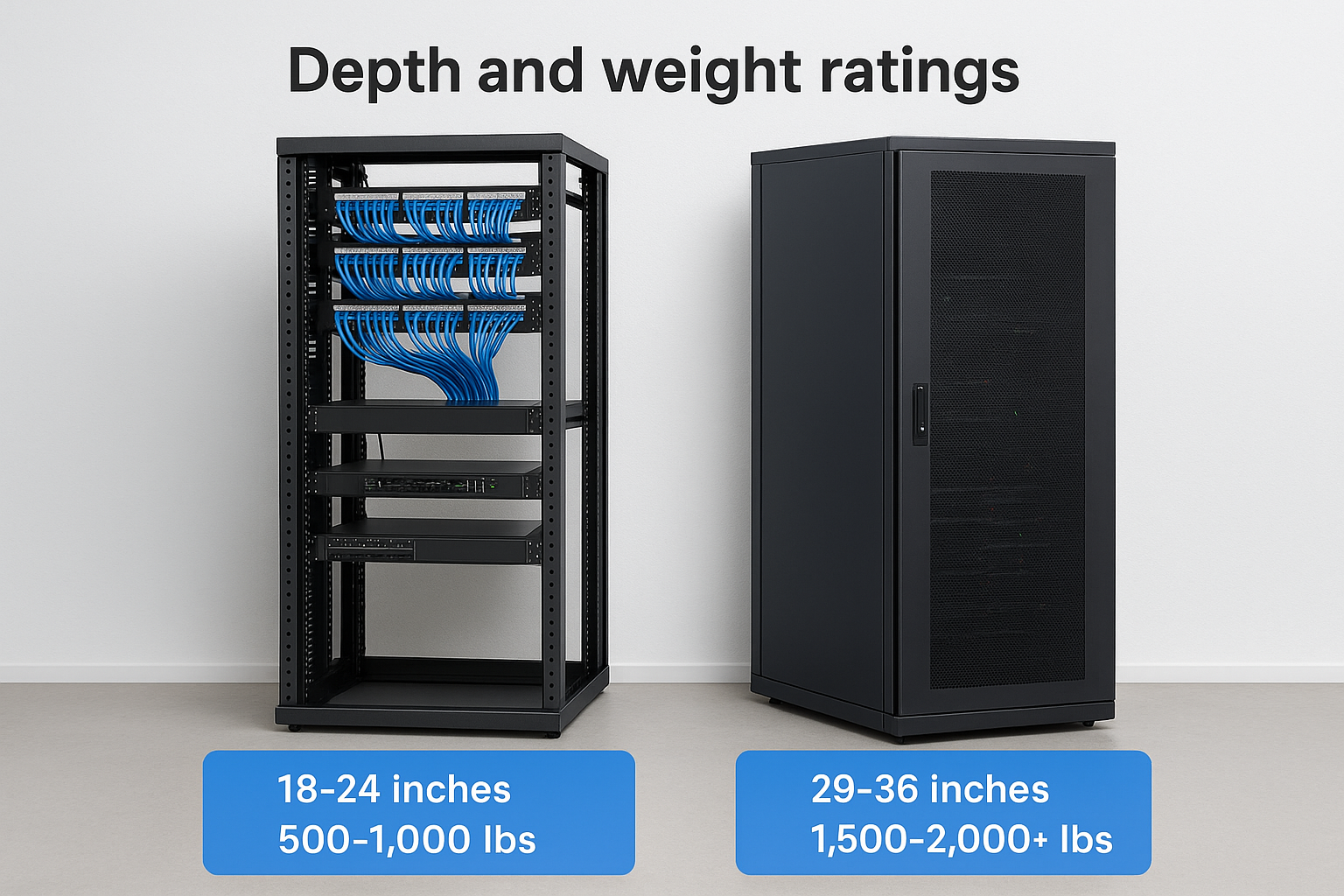
| Specification | Network Rack | Server Rack |
|---|---|---|
| Depth | 18-24 inches | 29-36 inches |
| Load rating | 500-1,000 lbs | 1,500-2,000+ lbs |
| Enclosure type | Open-frame | Enclosed cabinet |
| Primary use | Cable routing | Compute and storage |
Cable management and airflow design
Cable management and airflow requirements differ significantly between the two rack types. Network racks prioritize horizontal and vertical cable managers along the front and rear to organize patch cables running to dozens of ports. Server racks focus on rear cable routing that keeps power and data connections clear of the front-to-back airflow path, which is critical for preventing thermal shutdowns.
Placing server hardware into an open-frame network rack disrupts airflow and creates hot spots that shorten hardware lifespan and trigger unplanned downtime.
Matching your rack to your equipment type means your cooling strategy and cable organization align from day one rather than becoming problems you have to fix after hardware is already running.
How to choose the right rack for your site
The network rack vs server rack decision comes down to three questions: What equipment are you housing? How much does it weigh? And where does this rack sit in your overall infrastructure? Answering those questions accurately before you order hardware saves you from costly reinstallation work later.
Match the rack to the equipment
If your closet holds patch panels, switches, and cable management hardware, a network rack is the right fit. Its shallow depth and open-frame design give technicians clean access to every port without fighting through a sealed cabinet. If you are housing rack-mount servers, storage arrays, or UPS units, you need a server rack with the depth and load capacity to support that equipment properly.
Getting this wrong at the spec stage means pulling everything out and starting over once your hardware arrives on site.
Factor in your room layout and growth plans
Your available floor space and ceiling height affect which rack size makes sense. A 42U server rack in a cramped IDF closet wastes space and blocks airflow. Start by auditing your current equipment count, then add 20 to 30 percent headroom for future growth so you are not ordering another rack twelve months from now. If your site mixes networking and compute hardware, plan for separate cabinets in the same room rather than cramming both into one rack.
Consider power distribution and grounding as part of the decision too. Server racks require dedicated power circuits and proper grounding to handle the electrical load of multiple servers running simultaneously. Network racks have simpler power requirements, but you still need a UPS inline to protect sensitive switching hardware from power fluctuations. Planning these details at the rack selection stage prevents expensive electrical work after the installation is complete.
Next steps
The network rack vs server rack decision shapes every piece of infrastructure that comes after it, from cabling routes to cooling design to future expansion capacity. Get it right at the planning stage and your installation stays functional, organized, and easy to service for years. Get it wrong and you are pulling hardware and redoing work that should have been done correctly the first time.
Your next move is to audit your equipment list before you order a single cabinet. Identify what you are mounting, how deep each chassis runs, and where each rack sits in your infrastructure hierarchy. If you are running a commercial buildout in Southwest Florida and want a professional team to handle the design and installation from the ground up, contact CommX Networks to discuss your project. We bring 18 years of hands-on experience in structured cabling and network infrastructure to every site we work on.