
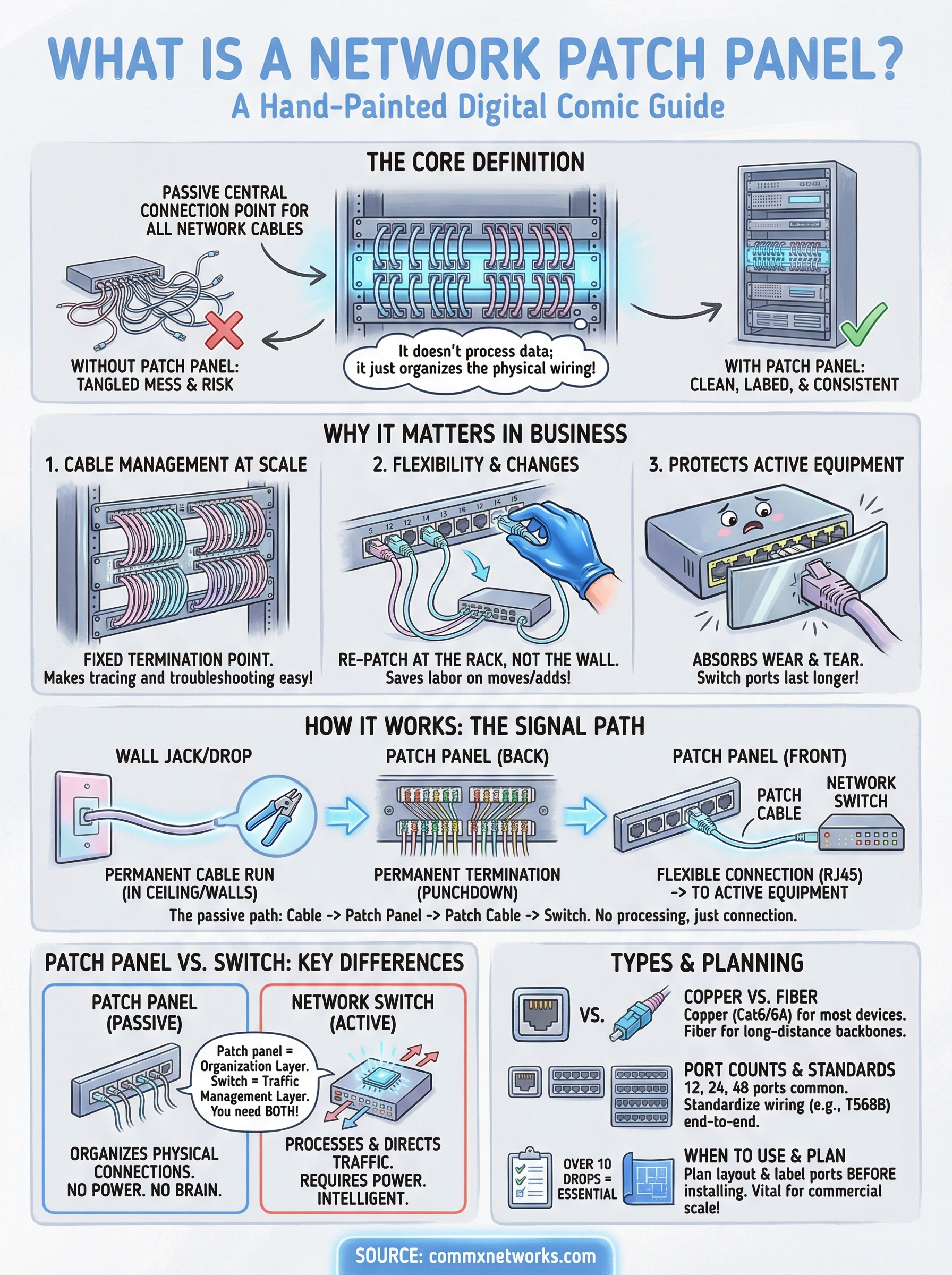
Open the back of any well-organized server rack, and you’ll find a row of numbered ports lined up neatly on a mounted panel. That’s a patch panel, one of the most underappreciated pieces of hardware in a commercial network. If you’ve been asking what is a network patch panel, the short answer is this: it’s a passive device that acts as a central connection point for all the network cables running through your building.
Patch panels don’t process data or make routing decisions. They simply give you a clean, organized way to connect incoming cable runs to your active network equipment, like switches, routers, and firewalls. Without one, you’d be plugging cables directly into switch ports, which turns into a tangled, unlabeled mess the moment you need to troubleshoot or make changes. For commercial facilities with dozens or hundreds of drops, that kind of setup creates real downtime risk.
At CommX Networks, we design and install structured cabling systems for commercial buildings across Southwest Florida, warehouses, office complexes, distribution centers, and more. Patch panels are a core component of every network infrastructure project we build. We’ve spent 18 years seeing what works at scale and what falls apart, and proper patch panel implementation is one of those details that separates a professional install from a DIY headache.
This article breaks down exactly how a patch panel works, where it fits in your network architecture, and, since it’s one of the most common points of confusion, how it differs from a network switch. Whether you’re planning a new buildout or trying to make sense of an existing setup, this guide will give you the clarity you need to make informed infrastructure decisions.
Why patch panels matter in business networks
Once you understand what is a network patch panel, the next question is why it belongs in every commercial network build. Small home setups can get away with plugging a few cables directly into a router. Commercial environments don’t have that luxury. When you’re managing 50, 100, or 200 cable drops across a warehouse or office complex, every connection decision you make upfront either saves you time or costs you time during the next outage or reconfiguration.
Cable management at scale
A patch panel gives your cabling system a fixed termination point. Every cable run from a wall jack or ceiling drop terminates at the panel before anything connects to active equipment. That design keeps your cable paths clean, labeled, and consistent, regardless of how many devices you add over time.
Without a patch panel, you end up with long cable runs going directly into switch ports. When those cables stretch across a rack, shift position, or get accidentally pulled, you have a real problem locating which connection belongs to which device. A properly labeled patch panel eliminates that guesswork entirely. You can trace any port back to its physical location in the building in seconds, which matters enormously when you’re troubleshooting an outage and every minute of downtime has a cost.
A single mislabeled or unmanaged cable run in a 100-port network can take hours to diagnose without a patch panel in place.
Flexibility when your business changes
Businesses move equipment, add workstations, and reconfigure floor layouts regularly. With a patch panel, those changes happen at the rack, not at the wall. You simply repatch a short cable from one port to another instead of pulling new cable through the ceiling or conduit.
That flexibility saves significant labor costs over the life of the network. A direct-connect setup forces you to either run new cable or accept a messy workaround every time your layout changes. A patch panel absorbs those moves without touching the infrastructure you already built, which is a major operational advantage in fast-moving commercial facilities.
Protection for your active equipment
Switch ports are not designed to handle constant plug-and-unplug cycles. Every time someone yanks a cable or reconnects a device directly at the switch, you’re adding mechanical wear to a port that costs real money to replace. Patch panels absorb that daily physical stress and keep your switches protected from routine handling.
For high-traffic commercial environments like distribution centers or manufacturing floors, this protection is especially relevant. Technicians and operators regularly move equipment around in those spaces. The patch panel takes the wear so your switches stay in working condition longer, which directly extends the return on your network hardware investment.
How a network patch panel works
Understanding what is a network patch panel becomes much clearer when you follow the signal path from end to end. A patch panel is a passive device, meaning it has no power supply, no processor, and no internal configuration. It simply provides organized physical connection points that link your permanent cable runs to your active network equipment through short, flexible patch cables at the front of the rack.
The physical connection path
The back of a patch panel contains punchdown terminals, where each cable coming from a wall jack or ceiling drop gets terminated by a technician. Each individual wire gets seated into a numbered slot, following a wiring standard like T568B, and secured in place. That termination becomes permanent for the life of your installation. You run your cable once, terminate it cleanly, and never touch that connection again unless something physically breaks. This is how structured cabling systems stay reliable for years without requiring constant rework inside your walls or ceilings.
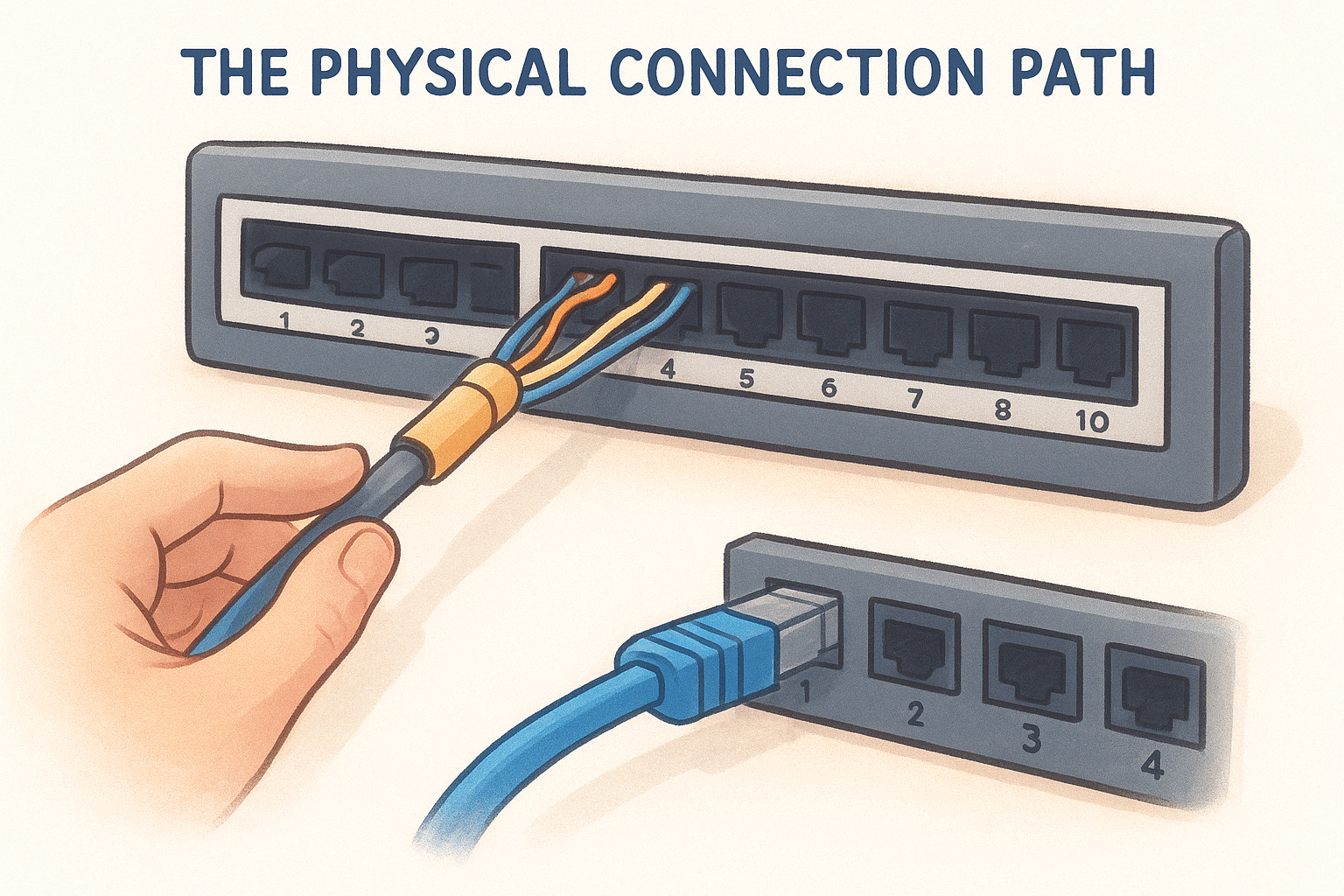
The punchdown connection on the back is built to last for the life of the installation, while the patch cable on the front absorbs all the daily wear from moves and changes.
What happens when you patch a connection
Once the back is terminated, the front of the panel exposes a row of standard RJ45 ports, each numbered to correspond with a specific cable run in your building. You connect a short patch cable from that front port to a matching port on your network switch, and the circuit is complete. Data travels from the device at the wall jack, through the cable in the ceiling, into the patch panel, and directly into the switch with no processing or interruption.
That two-step setup gives you full flexibility to reroute network traffic by swapping patch cables at the rack instead of pulling new cable through conduit every time your layout changes.
Patch panel vs switch: key differences
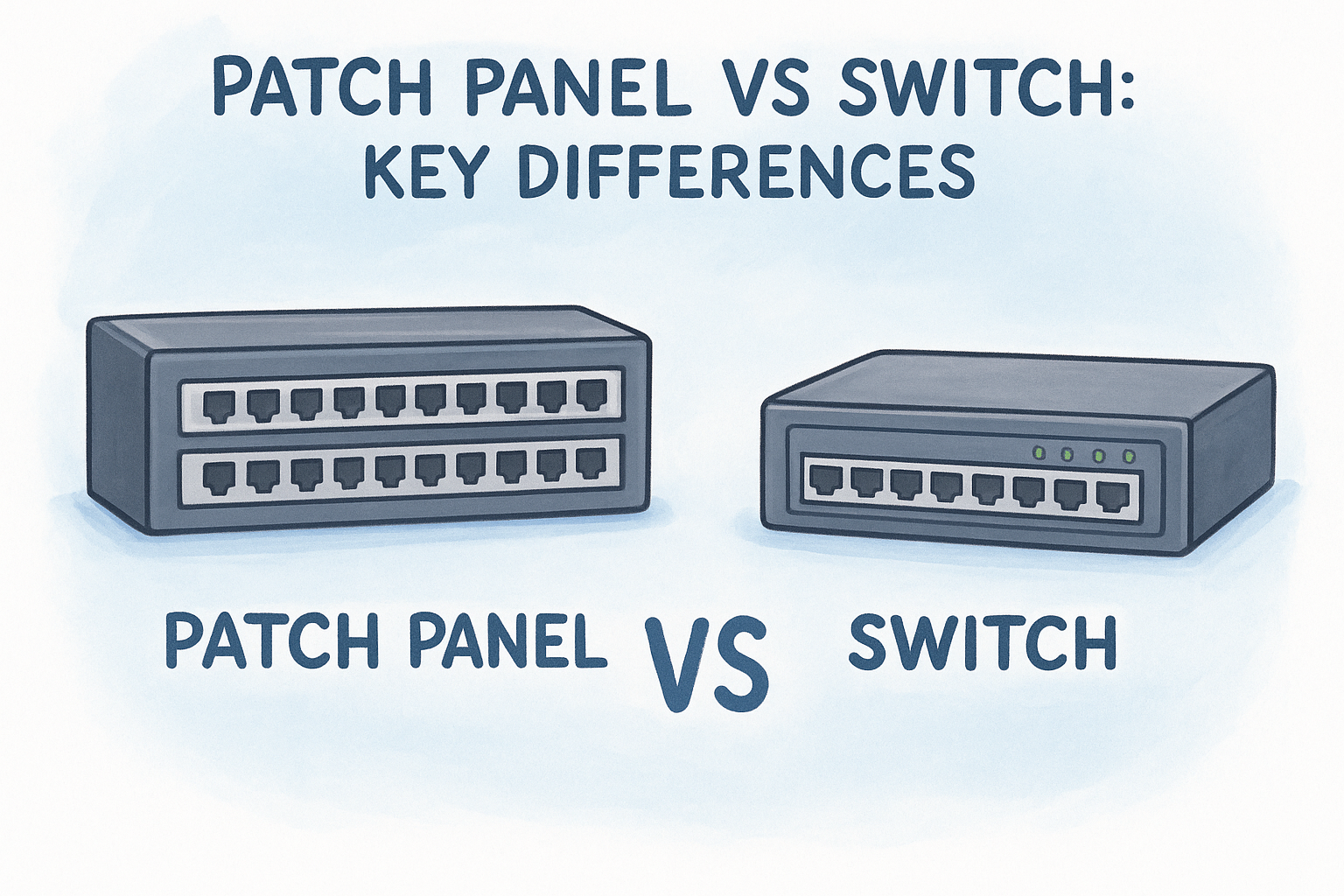
The confusion between these two devices comes up constantly, and it makes sense why. They sit right next to each other in the rack, they both have rows of RJ45 ports, and they’re both part of the same network. But what is a network patch panel compared to a switch comes down to one core distinction: a patch panel is passive, and a switch is active. One organizes your physical connections, the other processes and directs network traffic.
What a switch actually does
A network switch is an intelligent, powered device that reads the data packets traveling through your network and forwards them to the correct destination. Every device connected to a switch gets its own dedicated communication path, which prevents traffic collisions and keeps your network running efficiently across multiple devices at the same time. Switches make decisions; patch panels do not.
A switch without a patch panel works, but a patch panel without a switch gives you organized cables that go nowhere.
Switches also consume power, require firmware updates, and carry a failure risk that passive hardware simply does not. When a switch port fails, you lose connectivity for whatever device is plugged into it. That’s why protecting switch ports from constant physical handling matters, and why routing daily moves and changes through a patch panel instead of directly into a switch is standard practice in any professional installation.
Why you need both
Your network needs both devices working together to function reliably at a commercial scale. The patch panel handles your permanent cable infrastructure and gives you a clean, labeled termination point for every drop in your building. The switch handles data routing and device communication once those physical connections are in place.
Think of it this way: the patch panel is your physical organization layer, and the switch is your traffic management layer. Removing either one forces the other to compensate in ways it was never designed to handle, which leads to performance problems, messy cable management, or accelerated hardware wear over time.
Types, ports, and standards to know
Not every patch panel is the same, and choosing the wrong type for your environment creates performance problems you won’t catch until you’re troubleshooting an outage. Understanding your options before you build saves you from installing hardware that limits your network before it even goes live. Once you understand what is a network patch panel at a functional level, the next step is matching the right panel type to your specific facility and speed requirements.
Copper vs. fiber patch panels
Copper patch panels are the most common option in commercial networks and support Cat5e, Cat6, or Cat6A cable runs depending on the speed and bandwidth requirements of your facility. Cat6 supports 10 Gbps up to 55 meters, while Cat6A extends that to 100 meters, making it the better choice for large-footprint commercial environments like warehouses or multi-floor office buildings.
If you’re building for long-term scalability, Cat6A infrastructure with matching patch panels gives you room to grow without rewiring.
Fiber patch panels serve a different purpose. They terminate fiber optic cable runs and are typically used for high-speed backbone connections between floors, buildings, or MDF and IDF closets. Fiber panels require compatible LC or SC connectors and are significantly more sensitive to installation quality than copper, which makes professional termination non-negotiable for reliable performance.
Port counts and wiring standards
Patch panels come in 12, 24, and 48-port configurations, and the right choice depends on how many cable drops your facility has per rack location. A 24-port panel fits most small-to-mid-size commercial buildouts, while larger facilities with dense cable runs typically use 48-port panels to keep rack space efficient without consuming more rack units than necessary.
Every copper patch panel follows a wiring standard, either T568A or T568B, and your entire installation needs to use the same standard end-to-end. T568B is the more common choice in commercial environments across the United States. Mixing standards anywhere in the run creates a miswired circuit that won’t pass a cable test, so your installer needs to confirm the standard before terminating a single drop.
When to use one and how to plan it
If you’re still asking what is a network patch panel and whether your facility actually needs one, the answer comes down to scale and longevity. Any commercial environment with more than 10 cable drops benefits from a patch panel, and most professional installations include one regardless of size because the cost of adding it upfront is far lower than the cost of restructuring your cabling later.
Know when your setup requires one
Most small offices with a handful of workstations can function without a patch panel, but that changes quickly as your headcount or floor space grows. If your facility has multiple rooms, floors, or zones where network drops run back to a central rack, a patch panel is not optional. It’s the only practical way to manage those connections without creating a maintenance problem that compounds every time you add a device or move a workstation.
Common facility types that consistently require a patch panel:
- Warehouses and distribution centers with drops across multiple zones
- Multi-floor office buildings with an MDF and IDF setup
- Manufacturing facilities with workstations spread across a large floor
- Retail centers with POS systems, cameras, and access points on separate runs
Once you exceed 15 to 20 cable drops in a single rack location, managing direct-connect cables without a patch panel becomes a full-time headache.
Plan your layout before you install
Start with a complete count of every cable drop your facility needs, including current devices and realistic growth over the next three to five years. Add 20 percent to that number as a buffer and use that figure to determine your panel port count and rack space requirements. A 24-port panel fits within 1U of rack space, while a 48-port panel stays within 2U, so planning your rack layout on paper before installation prevents you from running out of space mid-project.
Label every port before you terminate a single cable. Use a consistent numbering system that maps each patch panel port to its physical location in the building, such as room number and drop number. That documentation becomes your most valuable troubleshooting tool the first time something stops working and you need to isolate the problem fast.
Next steps
Now that you understand what is a network patch panel and how it fits into your overall network architecture, the next move is applying that knowledge to your specific facility. A patch panel is not an optional upgrade for commercial environments; it’s a foundational component that determines how manageable your network stays as your business grows. If you’re planning a new buildout, expanding an existing office, or inheriting a cable infrastructure that was never properly organized, getting your patch panel strategy right from the start saves you significant time and money down the road.
Every structured cabling project we build at CommX Networks includes a properly planned and labeled patch panel setup designed to scale with your operation. Whether you’re managing a warehouse, a multi-floor office, or a distribution center across Southwest Florida, our team handles the full physical layer from cable runs to rack termination. Contact CommX Networks to discuss your project and get a professional assessment of your facility’s infrastructure needs.